Relationship Strength: How It Works
What the feature does, the signals behind it, and what stays private
Relationship Strength helps your team answer two questions Getro couldn't answer before: how well does anyone on my team actually know this contact, and who's the right person to ask for an intro? It does this by turning your team's email and calendar activity into clear, explainable signals — without ever reading the content of your messages or meetings.
In this article, you will find the following:
- An overview of the relationship strength functionality
- How the reachability and connections work and appear
- Frequently Asked Questions
To follow the steps to connect your Google Workspace account, visit this article.
The problem it solves
When you search your network for a candidate, an expert, or a business contact, Getro has always been able to show you who exists. What it couldn't show you is how well your team actually knows that person, or who on the team is best positioned to make the introduction. Without that context, a great search result is just not as powerful — someone still has to manually figure out the relationship and track down the right connector.
Two indicators, working together
Relationship Strength is the combined name of these indicators working together: Connections and Reachability combine to show you the relationship strength. Getro adds these two connected indicators, both visible on contact profiles and in your contacts list:
1. Connections — "How many people on my team are connected to this person?"
In the contacts page, the number of LinkedIn connections the person has is listed.
2. Contact Reachability — “How likely is it that we can get in touch with this person?”
A team-wide rollup with four levels, based on how many teammates have a Warm, Known, Cold, or No connection to the contact:
High — very likely to get a warm intro. At least one teammate has a strong relationship, or several have real connections.
Medium — a possible path exists through a thinner or broader set of connections.
Low — only weak signals — likely a cold reach.
None — no one on the team has a connection to this contact via LinkedIn or Google sync.
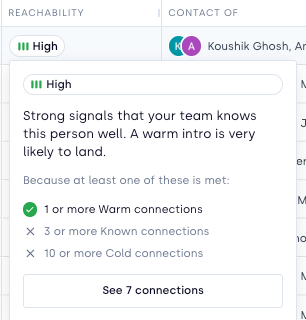
In your contacts, you can filter and sort by both reachability and connections. You can use these filters to strategize your outreach approach.
What feeds the signal
Connections and Reachability are built from real interaction history, not guesses. Once a team member connects their Google account, Getro looks at things like:
Recent, two-way email activity between that person and the contact — including how often and how recently you've been in touch.
Calendar meetings you've shared with the contact.
Continuing to review LinkedIn network connections, as well.
Each contact's rating updates automatically as new activity comes in — there's no manual scoring required.
Within the intro-paths tab in your contact's profile, you can see a per-teammate rating with three levels that account for the reachability and connections information together to detail how warm the relationship is for each person in your network:
Warm — a strong, active relationship. A warm intro is very likely to land.
Known — a real connection, but older or thinner. Worth confirming before committing to an intro.
Cold — no meaningful signal. Treat as a cold outreach unless you know otherwise.
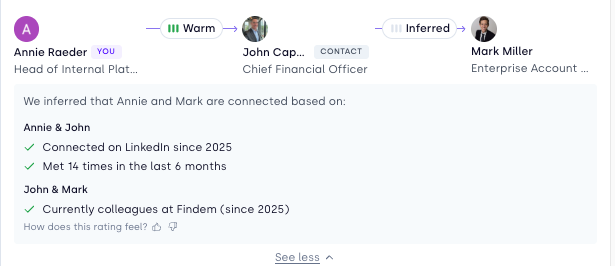
Each level is driven by a transparent, rules-based combination of signals (see below) — never a hidden black-box score. Hovering over a rating shows the reasons behind it, such as “5+ two-way emails in the last year” or “met 3 times in the last 6 months.”
Where you'll see it
Contacts list — Reachability and Connections appear as columns. These also appear as filters in the "Network" filter section.
Watch how to filter and view both in your contacts list and search results. You can see these columns in your contacts and in your Getro Lists.
Contact profile — the “Intro paths” tab groups the people connected to a contact by strength, with the reasons behind each rating.
See this in action here.
How your data is handled
Privacy, in plain terms Metadata only. Getro reads who emailed whom, when, and whether a calendar meeting happened — never the subject line content, message body, or event description. Getro doesn't read your emails. The permission Google grants (metadata-only access) cannot return message content, so there's no way for it to be accessed even inadvertently. You choose what to share.
Disconnecting deletes your data. If you disconnect your Google account, the interaction data Getro collected from it for relationship strength is deleted. |
Current availability
Because the feature is in beta, it's being turned on network by network. If you don't see it yet, check with your Getro Customer Success contact through help@getro.com.
Frequently Asked Questions
Is the strength rating the same for everyone on my team looking at a contact?
No — Connection Strength is specific to each person's own relationship with a contact. Reachability is the team-wide summary that rolls all of those individual ratings up into one view.
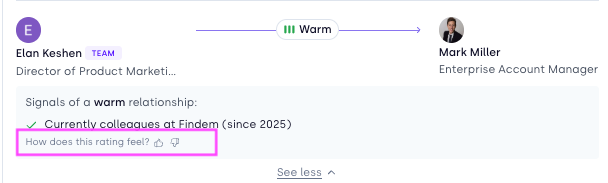
Can I disagree with a rating?
If you feel a rating doesn't reflect your actual relationship, you'll be able to give feedback directly in the product. We use that feedback to keep improving the underlying model.
Does connecting my calendar without email (or vice versa) still help?
Yes. Email and calendar are independent signals — connecting either one contributes to your ratings, and connecting both gives the most complete picture.
Will this create duplicate contacts?
Getro matches interactions to your existing contacts wherever possible, rather than creating duplicates. If a match can't be made confidently, the interaction won't be attached to the wrong profile.
Related guide: “Connecting Your Google Mail & Calendar to Getro” for step-by-step setup instructions.
Questions? Reach out to your Getro Customer Success contact, or email help@getro.com.